All vendor profiles stay safely stored in Complex360, so new committee members and managers immediately get access to the existing vendor list without chasing numbers from personal phones or chats.

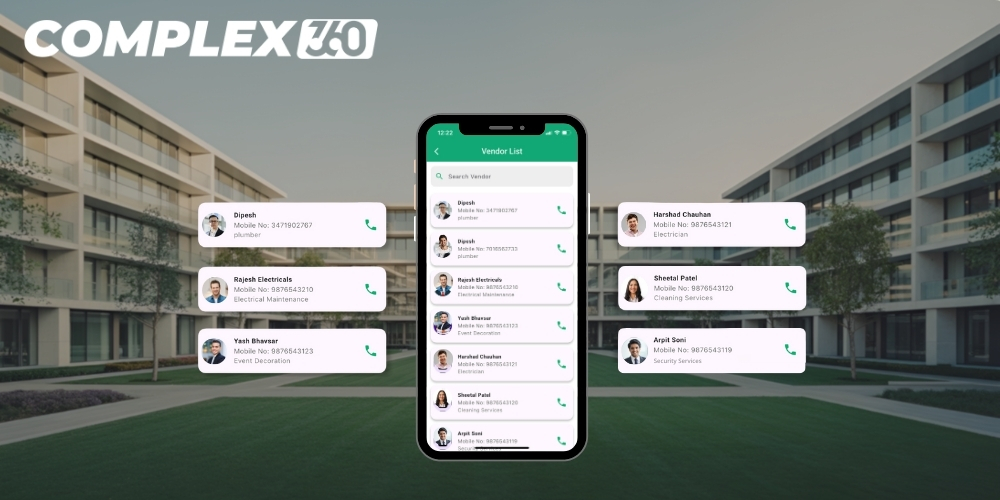
Complex360 Smart Vendor Management App for Commercial Complexes
Vendors handle most of the real work in any commercial complex: plumbers fix leaks, electricians solve power issues, cleaning teams maintain common areas, and security agencies safeguard offices and shared spaces. Complex360 gives your committee and facility team a smart vendor management app where they can add, update, and manage the details of all vendors who actually work with that specific commercial complex.
Centralised directory of committee‑approved vendors
Complex360 does not supply a pre‑loaded vendor list; every vendor is added and maintained by the committee, facility manager, or authorised staff. Only those plumbers, electricians, cleaners, security agencies, and other service providers who genuinely serve your commercial property are stored, keeping the directory clean, relevant, and easy to trust.
Each vendor profile includes work type, category, mobile number, pincode, address, and a short description, so anyone in the management team can quickly see who is responsible for which kind of job and contact the right vendor without searching scattered contacts.
Centralise complex vendors
Keep every trusted vendor who works with your commercial complex in one organised list, managed directly by your committee.
Call the right vendor faster
Search the vendor you need and call directly from the app during any issue or emergency, without hunting through scattered contacts.
Committee control and continuity
Let current and future committees add, edit, or disable vendors so contact details never get lost during handovers.
Detailed vendor profiles, contracts and notes
Every vendor gets a structured profile that reflects how your complex works with them instead of just a name and phone number. Committees can record contract type, scope of work, preferred visit timings, towers or blocks served, and internal notes that future members should know so new facility managers can immediately understand which vendors are active, what they do, and any special instructions.
Fast search, filters and one‑tap calling from the app
The vendor list is designed for real‑world use, especially when something breaks and time matters. Users can search by name, work type, category, pincode, or keywords from the description to instantly find the right vendor already approved for the complex, then tap the saved mobile number to start a phone call directly from the app, making it much faster to reach plumbers, electricians, or security vendors during water leaks, power failures, lift issues, or other emergencies.
Manage Your Property With Confidence
Complex360 gives property owners, secretaries, and administrators a complete digital system to manage all units, occupants, and records effortlessly. Everything stays organized, accessible, and up to date.
Better complaint resolution and everyday operations
Because only complex‑specific vendors are stored, staff never waste time checking whether a contact is valid or allowed to work on‑site. When a tenant raises a complaint, the team quickly finds the correct vendor in Complex360, calls them from the app, and tracks the issue internally, reducing downtime for critical services and improving trust in management while gradually phasing out weaker performers.
Vendor list view that matches how committees work
On the screen, Complex360 presents vendors in a clear table layout that is easy for committees, managers, and guards to read.
| Column | Purpose |
|---|---|
| Image | Vendor or company photo/logo uploaded by the committee for quick recognition. |
| Name | Vendor or company name saved by the management team. |
| Occupation | Work type such as plumber, electrician, cleaner, or security service. |
| Contact No. | Primary mobile number used for one‑tap calling from inside the app. |
| Pincode | Main service location or base area for the vendor. |
| Description | Short note about expertise and the kind of work done for the complex. |
| Address | Office or base address for coordination and billing. |
| Actions | Options to view, edit, enable/disable or delete a vendor entry. |
Simple onboarding when a new vendor starts working with your complex
Whenever your commercial complex starts working with a new plumber, electrician, cleaning agency, or security provider, their details can be added through a guided Create Vendor form. The committee or manager fills in the vendor name, work type, mobile number, category, contract type, address, pincode, and a brief profile description, and can also upload a profile image or logo, so within a few steps that vendor becomes part of the official list for your complex, ready to be searched in seconds and called directly from the app whenever maintenance work or an emergency arises.
Frequently asked questions
Typical facility‑management tools allow multiple vendors per category, and Complex360 follows the same approach so committees can add as many approved vendors as they practically need for each service area.
Only users with the right role and permissions, such as committee members, facility managers, or office staff, can add, edit, disable, or delete vendor records, giving you clear control over who can change contact details.
Complex360 does not supply any vendor database; all vendor details are added and managed by your committee, facility manager, or authorised staff, so the list always reflects the real vendors working with your commercial complex.
Yes. Once a vendor’s mobile number is saved, authorised users can search the vendor and place a direct call from the app, which is especially useful for urgent issues like leaks, electrical faults, or lift breakdowns.
Your vendor directory is private to your Complex360 account and is not shared as a public marketplace, so it stays a centralised list of trusted vendors approved by your own committee.
Complex360 lets you create and manage multiple vendor categories such as plumbing, electrical, housekeeping, security, gardening, and more so it is easy to find the right type of service provider when needed.