
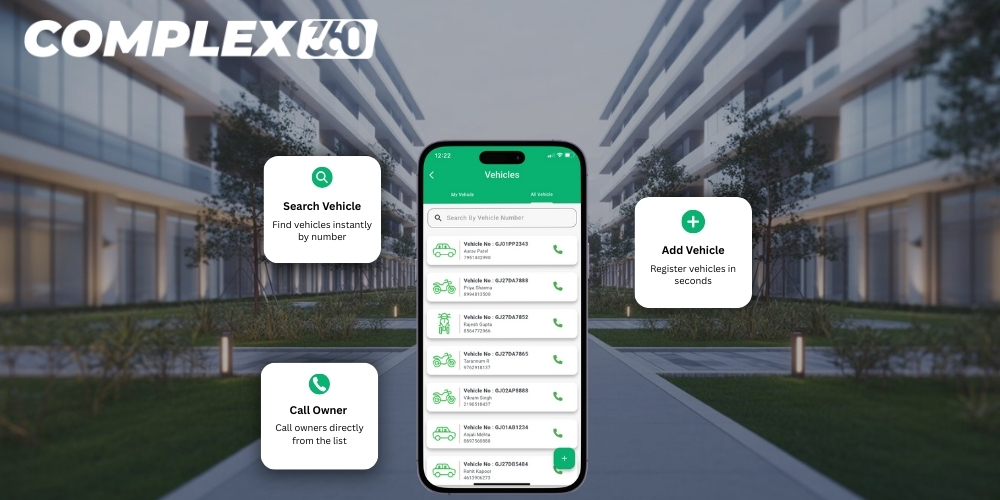
Manage Every Vehicle in Your Complex Without Parking Confusion
Staff cars, tenant bikes, company vehicles, and visitor vehicles enter and exit your commercial complex every day, but their details usually stay scattered across stickers, registers, and gate notes. Complex360 Vehicle Management brings every vehicle into one organised list linked to offices and shops so your committee and security team always know exactly whose vehicle is inside and when it was last updated.
See all vehicles in one clear register
Instead of maintaining separate lists for different vehicle types, your team gets a single, searchable register of every vehicle linked to the complex. The Vehicles screen shows property number, owner or tenant name, vehicle number, vehicle type, mobile number, and created/updated dates in one neat table, so it is always clear which vehicle belongs to which office or shop.
Security staff and committee members can quickly switch between “My Vehicle” and “All Vehicles” views, or search by property number, owner name, or vehicle number to find a specific entry in seconds. Whether a vehicle belongs to a long‑term tenant, a visiting vendor, or a guest approved by the security guard, it appears in the same structured list, making it easier to control parking, verify entries at the gate, and resolve disputes about who is allowed to park inside.
Add vehicles in seconds without confusing forms
Complex360 keeps the Add Vehicle process simple so your team actually uses it every day instead of falling back to paper or WhatsApp. From one clean screen, you pick the property, choose the vehicle type (2‑wheeler or 4‑wheeler), enter the vehicle number, and optionally upload a vehicle image, all within a few clicks, which makes it easy to register cars and bikes for new business tenants or frequent visitors as soon as they start using the complex.
Because the form is standard for every unit, vehicle data stays clean and consistent across the entire property. Guards and committee members do not need special training; they just follow the same fields each time and the system automatically adds created and updated timestamps, so you always know when a vehicle was added or changed and have a reliable register to refer to during security checks, parking allocation, or dispute resolution.
See Vehicles for Every Unit
View all vehicles linked to each office and shop in one organised register, so you always know which vehicle belongs where.
Simple ‘My Vehicles’ View for Users
Let owners and business tenants quickly see only the vehicles registered against their own unit, in a clean, focused view.
Always‑Updated Vehicle List for Security
Keep security teams in sync with live vehicle records, so gate checks and parking verification stay smooth and accurate.
Track tenant, staff, and visitor vehicles together
In most commercial complexes, tenant vehicles sit in one list, staff vehicles in another, and visitor vehicles only exist in a guard’s rough register. Complex360 brings all of them together so your security team and committee see one combined view of every vehicle that has permission to enter or has entered recently, with each entry clearly showing whether it belongs to a tenant, staff member, or visitor along with the linked unit and contact details, reducing confusion at the gate and inside the parking area.
When a visitor arrives, the guard can quickly add their vehicle with basic details instead of writing on paper, and that record immediately becomes part of the same vehicle list. Later, if there is a question about an unknown car in the parking lot or a past incident, the committee can simply search the vehicle number to see which unit it was mapped to and when it was last seen, making parking control and security checks far more reliable.
Manage Your Property With Confidence
Complex360 gives property owners, secretaries, and administrators a complete digital system to manage all units, occupants, and records effortlessly. Everything stays organized, accessible, and up to date.
Import, export, and update vehicles without losing track
Whenever there is a big move‑in or data cleanup, the committee does not need to enter every vehicle one by one. With Complex360, you can bulk import vehicle details for multiple offices and shops from a file and instantly build a complete vehicle register for the complex, while the export option lets you download the latest list for audits, parking allocation discussions, or sharing with the security agency so everyone works from the same up‑to‑date data.
As tenants sell vehicles, change numbers, or move out, committee members can quickly edit or deactivate entries instead of creating duplicates, with created and updated timestamps showing when each record was last touched to help you spot stale data and keep the register clean. Over time, this disciplined but simple import‑edit‑export flow turns vehicle records into a dependable source of truth for security, parking planning, and dispute resolution.
Frequently asked questions
A commercial complex can keep a record of all vehicles by using a vehicle management system that stores property number, tenant or owner name, vehicle number, type, and contact details in one central list, making it easy for the committee and security team to see exactly which vehicles belong to which offices or shops at any time.
Yes. Owners and business tenants can use the “My Vehicles” view to see only the vehicles linked to their own unit, which avoids confusion and lets them quickly check whether all their cars and bikes are correctly registered in the complex system.
Visitor vehicles can be added by the security guard with basic details such as the unit to visit and vehicle number so they appear in the same vehicle list as tenant vehicles, and later the committee can search the number to see when and for whom it was added.
Yes. The vehicle management system can handle vehicles for multiple office towers, wings, and shops in the same commercial campus, with each vehicle mapped to a specific property so shared parking spaces remain organised.
When parking disputes occur, the committee can open the vehicle register and see which unit a vehicle is assigned to, along with timestamps for when it was added or updated, reducing arguments about unauthorised vehicles and helping enforce parking rules fairly.
Yes. Committees can bulk import vehicle details from a file when they start using the system or when many new tenants move in, and they can export the latest vehicle list for audits, parking allocation plans, or sharing with security vendors so everyone works from the same up‑to‑date data.
When a tenant sells a vehicle or moves out, committee members can edit or deactivate that vehicle entry instead of deleting history, keeping the register accurate for current use while still preserving a record of older vehicles for security and compliance needs.